Turn warehouse signals
into coordinated action.
I connected live D365 F&O warehouse context, specialist agents and human-approved escalation—bringing operational intelligence into Teams and the ERP experience supervisors already use.
Help the supervisor
see what needs attention.
A blocked location, a short pick or an overdue load changes the shift. Supervisors need to connect the exception with work, inventory and delivery context before deciding what to do.
I started with that operating problem. The aim was to bring relevant evidence together, route exceptions to a focused capability, and make escalation visible where the team works.
My role: connect warehouse process knowledge with agent architecture, validate the experience against F&O, and define the boundaries needed for operational adoption.
Start with what the platform already does.
I tested native Workload Insights before extending the platform. Its worker briefing provided a useful baseline. The additional opportunity was supervisor-level exception handling: assembling context mid-shift, focusing attention and routing the issue for action.
Keep native capabilities where they fit. Add an agent where the business decision needs broader context and an explicit escalation path.
Answers grounded in the warehouse.
The work was developed through a client engagement and validated with real F&O queries and screens. A supervisor could ask for open work, provide the warehouse when prompted, and receive a summary checked against F&O. A request for work details brought header and operational lines together.
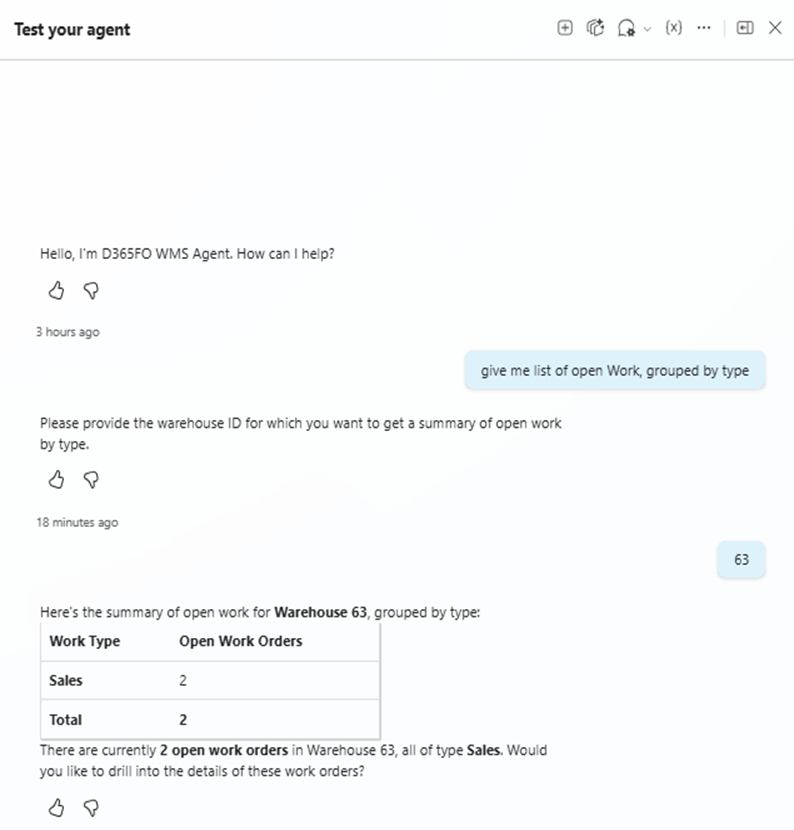
Original published implementation capture. The journal identifies USMF validation examples; these are live system responses rather than fabricated interface illustrations. Source article ↗
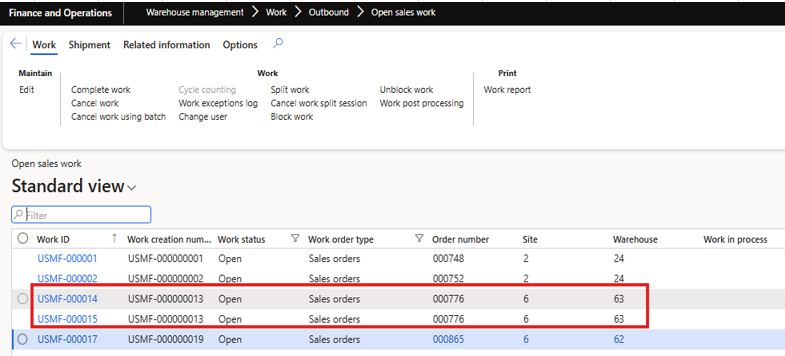
The matching F&O screen shows two open sales work records in warehouse 63. Original capture from the same validation article ↗.
The important shift was from navigating records individually to asking an operational question and receiving connected evidence. When the question required procedures rather than transactions, it exposed a separate need: governed SOP and knowledge sources.
One operational experience.
Two agents with distinct jobs.
Warehouse orchestrator
Handles broad warehouse questions and brings work, load and inventory context together. Routes exception requests to the connected specialist.
15 tools in the published configurationException specialist
Focuses on blocked work, short picks and overdue loads, with the context lookups needed to explain them. Owns the escalation conversation and flow.
6 tools in its scoped endpoint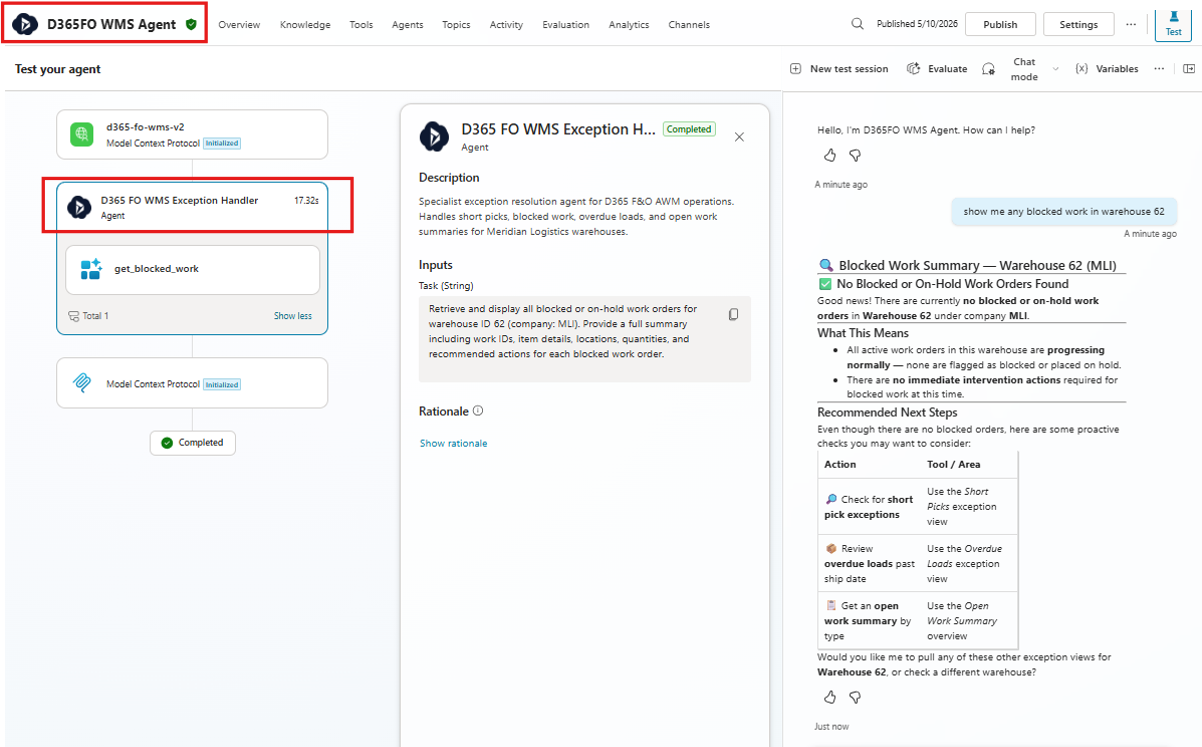
Original Copilot Studio capture from the multi-agent article. The design separates general warehouse assistance from exception handling. Source article ↗
A practical lesson: routing instructions were not enough when both agents could see every tool. I narrowed the specialist’s exposed capabilities while retaining one shared MCP service. That controls its tool surface; ERP permissions and endpoint authorization remain separate security responsibilities.
The exception belongs in the ERP experience.
Once an operator confirms escalation, the specialist triggers a Power Automate flow. A Teams Adaptive Card draws attention to the issue; an Agent Feed item brings the same escalation into D365 F&O Immersive Home.
The operator decides whether the identified exception should be escalated.
An Adaptive Card communicates the issue through the operational channel.
An Agent Feed item keeps the escalation visible inside Immersive Home.
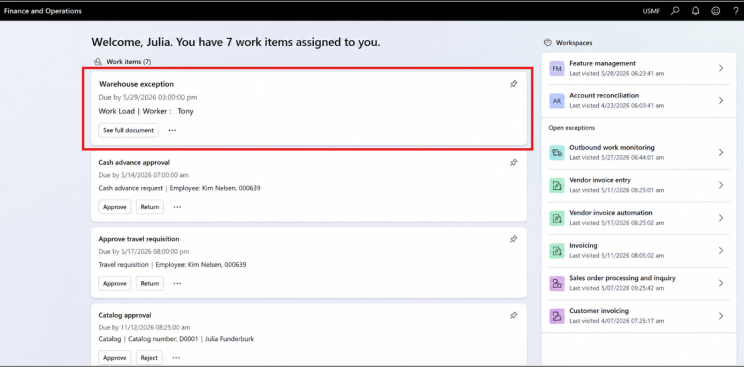
Original article screenshot of the Immersive Home integration. This is the implemented ERP experience, not a conceptual mockup. Source article ↗
This changes the handoff: the insight has a place in the team’s workflow and in F&O. The demonstrated action is notification and an ERP feed item; it is not an automatic inventory adjustment or work-order correction.
A service the operation can adopt.
Security shapes the responsibility
Scoped tools reduce what the specialist can invoke. Key Vault moves secrets out of local configuration. ERP roles, integration identities, least privilege and auditability determine who should see data and initiate actions.
The security chapter makes these operating-model questions explicit. It does not establish that every per-user authorization or monitoring control was already implemented.
Cloud deployment makes it usable
The MCP service was deployed to Azure Container Apps and connected to Copilot Studio, removing the dependency on a developer’s laptop. The agents coordinate the interaction; the hosted tool layer connects to F&O.
That is the foundation for production adoption. Full rollout still requires an agreed identity model, monitored operation, failure handling, release ownership and acceptance evidence.
A working path from question to escalation.
| Operational change demonstrated | Why it matters |
|---|---|
| Warehouse questions answered using live F&O data. | Brings relevant operational context into one conversation. |
| Parent-to-specialist routing with a narrower tool surface. | Gives exception handling a clear responsibility and scope. |
| Confirmed escalation reaches Teams and F&O Immersive Home. | Connects insight to the places where people coordinate and follow up. |
| Azure-hosted capability with Key Vault integration. | Establishes a deployable service foundation for further operational hardening. |
Delivery stage: hands-on client-engagement work, live-data validation and a cloud-hosted MVP. The nine articles do not establish a completed production rollout or measured business savings.
Next value measures: time to understand an exception, time to acknowledge escalation, unresolved-exception age and the proportion of escalations with sufficient evidence. These are proposed adoption measures, not claimed results.
Nine articles. One transformation journey.
The original journal documents the operational need, implementation decisions and delivery boundaries. Expand a stage for its contribution to the story.
01 · Recognize the decision gap
Blocked locations, priority orders and serial discrepancies reveal where supervisors must assemble context and make judgment calls. This frames the opportunity; it does not establish that every scenario was automated.
Read the article ↗02 · Validate native capability first
The native Workload Insights assessment distinguishes a worker’s shift briefing from supervisor exception handling. It gives the custom investment a specific purpose.
Read the article ↗03 · Connect the operational evidence
The client-engagement build connects real work, load and picking data to a reusable capability layer. Data and tools were validated before the conversational experience.
Read the article ↗04 · Make the capability available
Azure deployment, Key Vault and Copilot connectivity establish a cloud-hosted MVP. The article explicitly distinguishes this validation from full rollout.
Read the article ↗05 · Test useful agent behavior
Warehouse clarification and combined header/line lookups were tested against live F&O responses in USMF. Procedural questions exposed the need for approved knowledge sources.
Read the article ↗06 · Give each agent a responsibility
A parent WMS agent delegates exceptions to a specialist with six exposed tools. The parent retains fifteen tools; specialist scoping does not by itself prevent parent access or replace ERP authorization.
Read the article ↗07 · Bring escalation back into F&O
Operator-confirmed escalation triggers a flow that sends a Teams card, logs the escalation and creates an Agent Feed item in F&O Immersive Home. This closes the visibility loop without claiming autonomous warehouse correction.
Read the article ↗08 · Make access part of the operating model
Least privilege, role ownership, integration identities and auditability become adoption requirements. The article discusses governance design, not proof of a completed security certification.
Read the article ↗09 · Establish a deployable runtime
Azure Container Apps hosts the MCP tool layer independently of the developer’s machine. The article explains the deployment foundation and the continuing need for security, monitoring and governance.
Read the article ↗Connect the process.
Prove the change.
Prepare the operation.
This is how I approach ERP and AI transformation: understand the operational friction, validate native capability, introduce focused agent responsibilities, and connect the outcome to the existing workflow. Security, deployment and ownership are part of that design from the beginning.